How to Check Vehicle Owner Details in Pakistan: Complete Official Guide
Buying a used car or bike? Involved in an accident? Verifying ownership before a transfer? Or simply want peace of mind about the vehicle you’re driving? Knowing how to check vehicle owner details in Pakistan is essential for safety, legality, and avoiding fraud.
In 2026, provincial Excise & Taxation departments provide official online tools (MTMIS systems) that let you verify key vehicle information quickly. While full personal details are protected for privacy reasons, you can access important ownership and registration data legally.
This comprehensive guide explains everything: what information you can get, province-wise step-by-step methods, official portals, SMS options, apps, limitations, legal aspects, and pro tips. Follow the correct method for your province to stay safe and informed.
Always use official government websites for accurate and secure information.
Why Check Vehicle Owner Details?
- Verify ownership before buying a used vehicle to avoid stolen or disputed cars.
- Confirm registration and tax status.
- Check for pending token tax, fitness, or e-challans.
- Resolve disputes after accidents.
- Ensure legal compliance during ownership transfer.
Important Legal Note: Accessing vehicle information for legitimate reasons is allowed, but misusing data (harassment, fraud) is illegal. Respect privacy laws.
Before buying, always check e-challans to avoid hidden liabilities.
What Information Can You Get?
Publicly available details usually include:
- Owner’s name (or company name)
- Father’s/Husband’s name (in some provinces)
- Registration date and status
- Make, model, year, colour, engine & chassis numbers
- Token tax payment status
- Fitness certificate status
- Insurance (sometimes)
- Previous ownership history (limited)
Full CNIC or complete contact details are not publicly available online for privacy protection.
Province-Wise Guide to Check Vehicle Owner Details
1. Punjab – Most Advanced System (MTMIS)
Punjab offers the easiest and most detailed verification.
Online Method (Recommended):
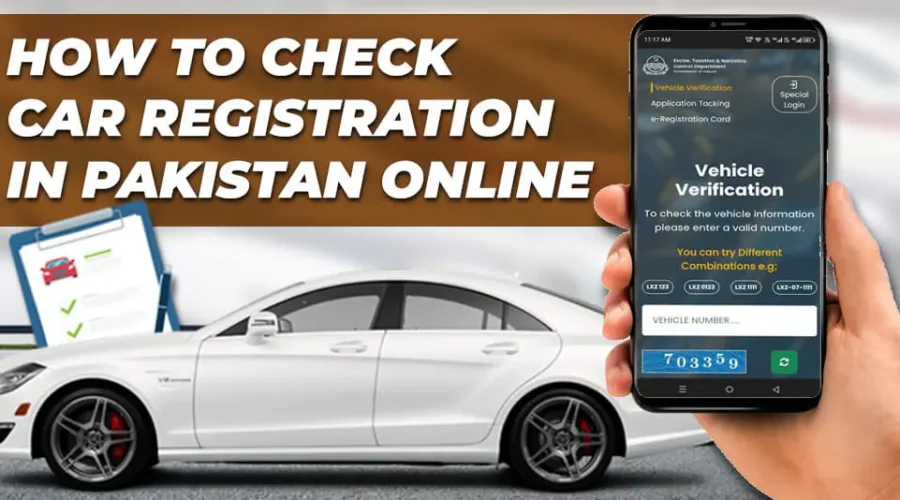
- Visit the official MTMIS Punjab portal: https://mtmis.excise.punjab.gov.pk/
- Enter the vehicle registration number (try different formats, e.g., ABC-123, ABC 123, etc.).
- Enter vehicle chassis number
- Complete CAPTCHA.
- Click Search.
You will see the owner name, registration details, tax status, engine/chassis numbers, and more.
Alternative Apps: Several official-linked apps pull data from this portal.
SMS Option: Limited; primarily use the website.
2. Sindh – Online Vehicle Verification
Steps:
- Go to Sindh Excise portal: https://excise.gos.pk/vehicle/vehicle_search
- Select Four Wheelers or Two Wheelers.
- Enter registration number.
- Search to view owner details and registration information.
You can also search by CNIC in some sections for vehicles registered under your name.
3. KPK (Khyber Pakhtunkhwa)
Method:
- Visit https://www.kpexcise.gov.pk/mvrecords/
- Enter registration number.
- View available details, including owner information.
4. Islamabad Capital Territory
Method:
- Visit the Islamabad Excise portal: https://islamabadexcise.gov.pk/
- Look for the Vehicle Verification or MTMIS section.
- Enter the registration number and registration date to get the owner and registration details.
5. Balochistan
Balochistan has improved digital services. Visit the official Excise & Taxation Balochistan website https://excise.balochistan.gov.pk/ and look for “Online Vehicle Verification” or visit local Excise offices. Some third-party apps aggregate data, but prefer official sources.
SMS Methods to Check Vehicle Details
In some provinces, you can send the vehicle registration number to specific short codes (e.g., 8785 or 8521 in certain cases) for basic information. Results may be limited compared to websites.
Mobile Apps for Vehicle Verification
Several legitimate apps pull public data from official portals:
- Punjab Car Verification apps
- General “Vehicle Verification Pakistan” apps
Warning: Only use well-reviewed apps that clearly state they source data from official excise websites. Avoid apps asking for excessive personal information.
Read More: How to Renew Driving License Online in Pakistan
How to Check During Vehicle Purchase (Safety Checklist)
- Verify registration details on the official portal.
- Match engine and chassis numbers physically with the vehicle.
- Check token tax and fitness status.
- Clear all e-challans. (How to pay traffic challan online)
- Get CPLC verification (especially in Sindh) for a stolen vehicle check.
- Hire a professional inspector for the mechanical condition.
- Complete biometric transfer (in Punjab) during ownership change.
Legal Aspects & Privacy
- Excise departments make basic registration data public for transparency.
- Full owner contact details are required for official requests (e.g., through police or court for genuine cases like accidents).
- Misuse of information can lead to legal action.
Common Problems & Solutions
- Wrong formats: Try variations with/without dashes and spaces.
- No results: Vehicle may be from another province or recently transferred.
- Outdated data: Portals sometimes lag; cross-check multiple sources.
- Technical issues: Try different browsers or times.
Pro Tips for 2026
- Always use official government websites ending in .gov.pk.
- Bookmark portals for your province.
- Check details from the buyer’s and seller’s perspectives.
- Combine with e-challan check and fitness verification.
- For high-value purchases, involve a trusted lawyer or agent.
Frequently Asked Questions
Can I check the owner’s name with just the number plate?
Yes, on official MTMIS portals you can see the registered owner’s name.
Is it legal to check someone else’s vehicle details?
Yes, for legitimate purposes like buying or accident cases.
How accurate is the information?
Generally very accurate, but minor delays in updates can occur.
Can I check by chassis number?
Some portals and SMS services support chassis number searches.
What if the vehicle is not showing?
It may be unregistered, from another province, or data not updated.
Do I need to pay any fee?
Online verification is free on official portals.
Final Thoughts and Next Steps
Checking vehicle owner details in Pakistan is now simple and mostly online, thanks to provincial MTMIS systems. Whether you’re buying, selling, or verifying, always start with official portals for accurate information.
Quick Action Steps:
- Note the vehicle registration number correctly.
- Visit the relevant provincial portal.
- Cross-check with physical vehicle details.
- Clear any e-challans before finalizing deals.
Stay safe and make informed decisions. Share your experience or specific province query in the comments.
Drive responsibly and verify before you buy!
You May Also Like:
Karachi Peoples Bus Service Routes and Timings
How to Check FBR Tax, NTN Status Online in Pakistan