
How to Check FRC NADRA Online — Updated 2026 Guide
You need your Family Registration Certificate. Maybe an embassy asked for it. Maybe you’re settling an inheritance matter, sponsoring a family visa, or enrolling a child in a university abroad. Whatever the reason, the process of getting your FRC from NADRA has changed significantly over the past couple of years, and a lot of the information floating around online is already out of date.
This guide covers everything you need to know about how to check FRC NADRA online in 2026, including the Pak ID app method, SMS tracking, what the certificate actually shows, the fee, and what to do if you need MOFA attestation for international use.
What Is an FRC and Why Do You Need It?
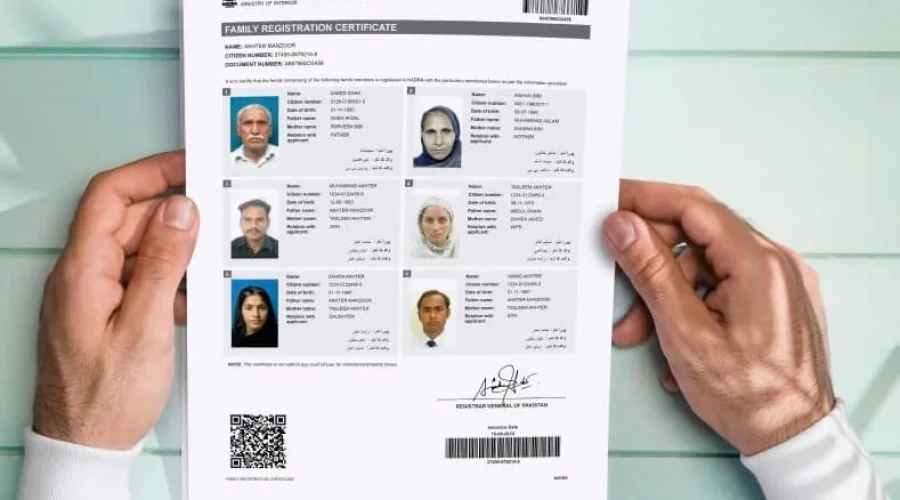
A Family Registration Certificate (FRC) is an official document issued by the National Database and Registration Authority (NADRA) that verifies the family composition recorded in the national identity database. It shows your relationship with registered family members such as parents, spouse, children, or guardians, all based on NADRA’s civil registration records.
The certificate is issued under Rule 19 of the NADRA (NIC) Rules, 2002, and reflects the family data available in the national database on the date of issuance.
Think of it as your official family tree on paper, backed by government data. Courts accept it. Embassies rely on it. Universities ask for it. People most commonly use it for embassy requirements, visa applications, and foreign immigration cases, but it also works as a legal document in court or for inheritance matters.
One thing to keep in mind: an FRC does not create a new legal relationship. It only reflects the family data already recorded in NADRA’s system. If family records are incomplete or outdated, the certificate will display only the data currently registered in the database.
Read: How to Change Name on CNIC in Pakistan
The Three Types of FRC NADRA Issues
NADRA issues the Family Registration Certificate in three different categories, depending on the applicant’s requirement:
- By Birth: Includes your parents and siblings. Useful when proof of family relations by birth is needed.
- By Marriage: Includes your spouse and children. Mostly required for immigration and visa purposes.
- By Adoption: Includes guardians and adopted children. This type is specifically designed for families with adopted members.
Most people applying for a family visa or sponsoring relatives abroad will need the “By Marriage” type. If you’re dealing with an inheritance or succession matter in Pakistan, the “By Birth” FRC is typically what lawyers and courts request.
NADRA has also introduced a combined certificate that merges both the applicant’s birth family and married family (“Alpha + Beta”) into one document. That combined FRC costs more, which we’ll get to in the fees section.
FRC NADRA Fee in 2026
The NADRA FRC fee in 2026 is Rs. 1,000. This single fee covers all Family Registration Certificate types, whether you’re applying for parents and children, siblings, or spouses.
The FRC urgent fee is the same as the regular one (Rs. 1,000) because FRCs are usually issued instantly once your family record is verified and no discrepancies are found. You don’t need to pay extra for urgent processing.
The combined FRC (Alpha + Beta) that merges both birth and married family costs Rs. 2,000.
The fee applies whether you apply online through the Pak ID app or visit a NADRA Registration Center (NRC) in person. No hidden charges, no separate processing fee tiers.
Read: How to Update Marital Status on CNIC
Documents Required for FRC NADRA
Before applying for the Family Registration Certificate, applicants must provide documents that establish both their identity and their relationship with the listed family members. As of 2025, applicants must also confirm their family composition by signing a digital or physical Bayan-e-Halfi (Affidavit of Family Verification). Providing incorrect or misleading information can lead to rejection of the application and legal consequences.
Documents you’ll need:
- Applicant’s valid CNIC, NICOP (for overseas Pakistanis), or POC (Pakistan Origin Card)
- CNIC/NICOP/POC of relevant family members (parents, spouse, siblings, or children)
- Child Registration Certificate (CRC or “B-Form”) for minors under 18
- Recent passport-size photographs of minors (plain white background, full face visible)
A critical point many people miss: family members must be linked in the NADRA database. If they’re not, you need to visit an NRC to link them first. Once linked, they auto-appear in your FRC.
Those family members who are not registered in NADRA, or whose record is incomplete, cannot be linked with the family tree. Sorting this out before you apply saves a lot of back-and-forth.
Read: How to Apply for Child B Form Nadra Online and Requirements
How to Check and Apply for FRC NADRA Online
There are two main ways to get your FRC in 2026: the Pak ID app (online) or a walk-in at any NADRA Registration Center. Here’s a breakdown of both.
Method 1: Pak ID App (Online Recommended)
Go to pakidentity.com/download or search “Pak ID” in the Play Store or App Store and install the official NADRA app.
Here’s the full step-by-step process:
- Download and register. Create an account using your CNIC/NICOP number, email, and mobile number.
- Log in. Use your credentials to access the main dashboard.
- Select FRC. After logging in, tap on the FRC tab from the main menu. This is the direct FRC online apply NADRA section.
- Review your family members. Log in to your Pak Identity account, navigate to the Family section, select FRC, and review the family members displayed in the system. Your registered family auto-appears.
- Complete biometrics. Follow the on-screen instructions to capture your fingerprints and photo using your phone’s camera.
- Pay the fee. Use the integrated secure gateway to pay via credit/debit card. eSahulat, EasyPaisa, and JazzCash are also available for FRC applications.
- Download your FRC. After processing, the digital FRC (PDF) becomes available for download in the ID Vault section of the Pak Identity application.
After successful online application, NADRA emails the FRC as a PDF to your registered email address within 24 hours. You can also log back into your Pak Identity account and re-download it from the “My Documents” section.
The digitally signed PDF from the Pak ID app is accepted by 95% of embassies, including those of the UK, Canada, USA, UAE, and Saudi Arabia. The PDF contains a QR code, NADRA seal, and the full family tree.
Read: How to Check CNIC Number Details Online
Method 2: In-Person at a NADRA Registration Center
Go to the nearest NADRA office. Get a token, fill the NADRA FRC form, provide biometrics, pay Rs. 1,000, and get a printed FRC instantly.
In most cases, FRCs are issued within a few hours when applying in person. Delays may occur if records need to be updated or corrected in the NADRA database before the certificate can be issued.
The in-person method is the better choice if any of your family members aren’t yet linked in the system, since staff at the NRC can help resolve record issues on the spot.
How to Track Your FRC NADRA Application Status
Once you’ve applied, you can check the status of your FRC through three official channels.
SMS to 8400
The SMS method is the quickest and most popular way to check your NADRA application status, no internet required, works on any mobile network. Send your NADRA application tracking ID (provided on your receipt when you applied) to 8400. Within seconds, NADRA will reply with the current status.
SMS to 8400 works for 10-digit tracking IDs on applications submitted within Pakistan. Overseas applicants must track online or via the Pak ID app as the SMS service is domestic-only.
Pak ID App Tracking
Log in to the Pak Identity app, go to “My Applications,” and view the status. This method provides comprehensive status information, including processing stage and dispatch updates.
Tracking your FRC application status is identical to tracking any other NADRA document. Use the same tracking ID provided on your FRC application receipt through SMS to 8400, the NADRA website, or the Pak ID app.
NADRA Helpline
Call 1777 (mobile) or +92 51 111 786 100 and provide your tracking ID to receive the current status of your application. This option works well if your SMS reply isn’t coming through or if there’s an unusual delay you want to query directly.
FRC for Overseas Pakistanis
If you’re living abroad, the process is slightly different. You can apply for an FRC through the NADRA portal without being in Pakistan. The Pak ID app is fully accessible internationally.
Note that family records must already be linked and updated in NADRA’s database. If updates are required, verification may take 4 to 7 working days before FRC submission.
Pakistani embassies in several countries also run NADRA facilitation desks where you can apply in person if you face issues with the app. MOFA’s website lists the available embassies with this service.
Read: How to Apply for NICOP as an Overseas Pakistani
MOFA Attestation: When Your FRC Needs to Go International
Getting your FRC from NADRA is step one. If you plan to submit it to a foreign embassy or immigration authority, you’ll need MOFA attestation on top of that.
The FRC is issued by NADRA and represents your complete family structure, but this document is only valid within Pakistan unless it is attested by MOFA. Without attestation, foreign authorities may reject your application.
When the certificate is required for use outside Pakistan, additional authentication is necessary through the Ministry of Foreign Affairs. Foreign embassies and immigration authorities often require confirmation that the document issued in Pakistan is genuine. MOFA attestation verifies that the certificate was issued by a recognized Pakistani authority and can be presented to foreign institutions.
The process works in two stages:
Stage 1 NADRA Verification: Confirm the FRC is the latest version and all information matches your CNIC and passport exactly. Even a single spelling difference can cause rejection.
Stage 2 MOFA Attestation: Submit the FRC to the Ministry of Foreign Affairs at their headquarters in Islamabad or sub-offices in Lahore, Karachi, Peshawar, or Quetta.
MOFA attestation is commonly required for family or dependent visa applications, immigration and residency procedures, school or university documentation abroad, and insurance or legal documentation overseas.
One important note from the MOFA Pakistan website: due to ongoing cybersecurity threats, the Government of Pakistan has temporarily suspended access to several government online portals, including the Apostille Online Portal, as a precautionary measure. Applicants are advised to check for updates before attempting to book appointments online. Always confirm current portal availability at mofa.gov.pk before making the trip.
Read: Orange Line Train Lahore: Stations list, Timings, Routes
Common Problems and How to Fix Them
Family members don’t appear in the FRC. If your family members are not yet linked in the NADRA database, visit an NRC to link them first. Once linked, they auto-appear in the FRC.
Application is delayed or rejected. Common mistakes include providing incomplete or incorrect information on the application form, failing to submit all required documents, and overlooking biometric verification. Double-check all details before submitting.
Overseas tracking is not working via SMS. Overseas applicants must track online or via the Pak ID app, as the SMS service is domestic-only. Use identityservices.pk or the Pak ID app dashboard instead.
Name spelling mismatch between CNIC and FRC. This is one of the most common causes of embassy rejection. Before applying for MOFA attestation, make sure every name on the FRC matches your CNIC and passport character for character.
FAQ: FRC NADRA Online 2026
Can I download the FRC as a PDF? Yes, if you apply through the NADRA portal, you can download the certificate after approval. It’s available in the ID Vault section of your Pak ID account.
Is the digital PDF accepted by embassies? Yes. The digitally signed PDF from the Pak ID app is accepted by 95% of embassies, including the UK, Canada, USA, UAE, and Saudi Arabia. It contains a QR code and NADRA seal.
What is the FRC fee in 2026? The standard fee is Rs. 1,000 for all FRC types. The combined FRC (birth + married family) costs Rs. 2,000. There is no additional urgent fee.
How long does it take to get an FRC? In most cases, FRCs are issued within a few hours when applying in person and within 24 hours for online applications.
Do I need MOFA attestation for the FRC? Yes, if you’re submitting the FRC to a foreign authority. Without MOFA attestation, the document may be rejected by overseas embassies and immigration departments.
Can overseas Pakistanis apply for an FRC without visiting Pakistan? Yes, many embassies and immigration departments accept FRC applications submitted through the NADRA online portal. The Pak ID app works internationally.
What if my family member is not in the NADRA system? Those family members who are not registered in NADRA, or whose record is incomplete, cannot be linked with the family tree. You’ll need to register or update their records at an NRC before the FRC can include them.
Your FRC is one of those documents you’ll scramble for at the worst possible moment if you don’t have it ready. The good news is the Pak ID app makes the whole thing genuinely straightforward now, you can go from logging in to downloading a PDF in under 30 minutes if your family records are already linked and clean in the NADRA database. Sort out any record gaps first, pay the Rs. 1,000, and you’re done. If you’re taking it international, plan for the MOFA attestation step and confirm the current portal status at mofa.gov.pk before heading in.


Mujahid Hassain
July 28, 2026 at 8:11 amFRC
SherazAhmad
August 4, 2026 at 11:18 pmFrc عمرہ کے لیے
SherazAhmad
August 4, 2026 at 11:20 pmشیراز مشتاق وڑائچ ضلع منڈی بہاوالدین تحصیل پھالیہ شہر اڈا پاہڑیانوالی سے
Frc
SherazAhmad
August 4, 2026 at 11:21 pmFrc کی کیا قیمت ہے
Waseem Hassan
August 5, 2026 at 10:00 amCnic card FRC
Rafiullah
September 9, 2026 at 3:28 pm03477746091